PS Remote Play elevates your gaming by letting you enjoy your PlayStation® experience far beyond your living room. Whether you have a PS5™ or PS4™, this app connects you to your console remotely from your Android device. Enjoy your favorite games from anywhere with complete ease and flexibility.
Features and Functionality
PS Remote Play provides a full suite of features to enrich your gaming:
1. Remote Screen Display:
- Stream your PS5™ or PS4™ console screen directly to your Android device. Experience console-quality gaming in the palm of your hand, no matter where you are.
2. Mobile Control Options:
- Play seamlessly using your device's on-screen controls. For Android 10+, connect a DUALSHOCK®4 wireless controller; for Android 12+, use the DualSense™ wireless controller; and for Android 14+, the DualSense Edge™ wireless controller, all delivering a console-like feel.
3. Voice Chat Integration:
- Join voice chats using your mobile device's microphone, keeping you connected with friends and other players during your gaming sessions.
4. Text Input Capability:
- Type on your PS5™ or PS4™ console using your mobile device's keyboard, making communication in games and apps quick and effortless.
5. Compatibility Requirements:
- Your setup needs Android 9 or later, the latest system software on your PS5™ or PS4™, and an active PlayStation Network account. A stable internet connection is required for smooth performance.
6. Data Usage Considerations:
- When on mobile data, be aware that this service uses more data than standard video streaming, which may lead to extra charges. Connectivity depends on your carrier and network.
7. Verified Devices:
- The app is optimized for select devices like the Google Pixel 8, 7, and 6 series, ensuring the best performance. Features may be limited on unverified devices.
8. Controller Compatibility:
- Enjoy flexible control options: DUALSHOCK®4 support for Android 10+, DualSense™ support for Android 12+, and DualSense Edge™ support for Android 14+.
9. Performance Considerations:
- Depending on your device, you might notice some input lag when using wireless controllers, which can affect responsiveness during gameplay.
Usage Guidelines and Notes
PS Remote Play is built to enhance your PlayStation® gaming but comes with a few key points to keep in mind:
- Device Compatibility: For optimal performance, use a verified device. Unverified devices may not support all features or games.
- Game Compatibility: Some games may not fully support remote play or might need special setup.
- Controller Experience: Features like vibration might feel different compared to playing directly on your PS5™ or PS4™ console.
- Input Lag: Due to your device's performance and network, you might experience input lag when using wireless controllers.
Conclusion:
PS Remote Play marks a major advancement in gaming accessibility. It gives PlayStation® fans the freedom to play their favorite games remotely on an Android device. By linking PS5™ or PS4™ consoles to mobile platforms, the app lets you stream gameplay, control your console, chat with friends, and interact seamlessly using various controllers. With features like on-screen display and easy text input, PS Remote Play ensures you stay connected to your gaming world, wherever you are.



 Download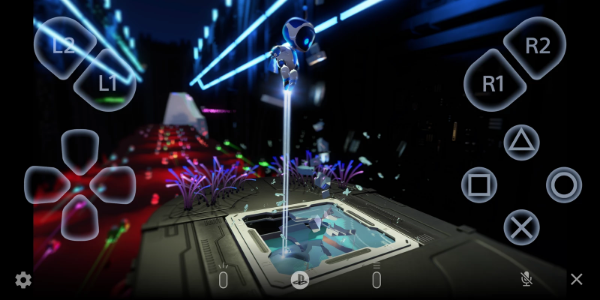
 Application Description
  Apps like PS Remote Play