Mastering Headshots in Free Fire: A Comprehensive Guide
Free Fire's fast-paced action demands precision, and headshots are the key to victory. This guide details how to improve your headshot accuracy, covering in-game settings, HUD optimization, and leveraging BlueStacks for enhanced PC gameplay.
Understanding Headshots
Headshots provide an immediate advantage, often eliminating opponents with a single well-aimed shot. Achieving consistent headshots requires a combination of optimal settings, effective techniques, and dedicated practice. Sensitivity settings are paramount, directly impacting aiming speed and accuracy.
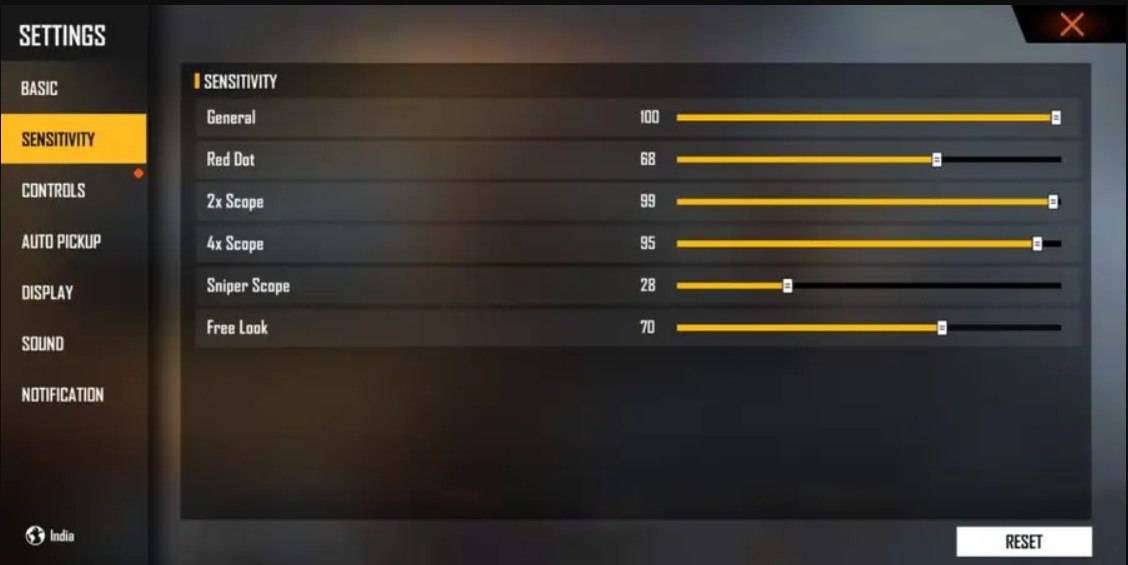
Optimizing Sensitivity Settings for Headshots
Precise sensitivity adjustments are crucial for smooth and accurate crosshair movement. The ideal settings will vary depending on individual preferences, but the following image offers a starting point:
Refining Your HUD Layout
Your Heads-Up Display (HUD) significantly impacts your control and aiming. A well-designed HUD enhances responsiveness and precision. Consider these adjustments:
- Fire Button Placement: Position the fire button for easy thumb access, potentially employing a three- or four-finger claw grip for enhanced control.
- Drag Shooting: Adjust the fire button size (50-70%) to optimize drag shooting for precise headshot swipes.
- Quick Weapon Switch: Place the weapon switch button near your thumb for rapid weapon changes.
- Crouch/Jump Buttons: Position these near movement controls for seamless execution of crouch + shoot and jump + shoot tactics.
- Scope Button: Keep the scope button easily accessible for quick aiming and headshot alignment.
Elevate Your Aim with BlueStacks
Playing Free Fire on a larger screen with keyboard and mouse control offers a significant advantage. BlueStacks provides several features to enhance your aim:
- Keyboard and Mouse Support: Map controls to your keyboard and mouse for superior aiming precision compared to touch controls.
- Customizable Key Mapping: Tailor controls to your style, assigning the fire button to the mouse for smoother drag shots and faster reactions.
- Enhanced Graphics and Performance: Experience smoother gameplay with higher graphics settings without lag or overheating.
- Improved Sensitivity Settings: Fine-tune sensitivity for better drag shots and scoped headshots.
By implementing these strategies and utilizing the power of BlueStacks, you can significantly improve your headshot accuracy and dominate in Free Fire.

 LATEST ARTICLES