In *Monster Hunter Wilds*, voice chat is an essential feature for multiplayer enthusiasts, yet it remains optional for those who prefer a quieter gaming experience. If you're interested in using or muting voice chat without relying on external platforms like Discord, here's how you can navigate the in-game settings.
How to Use and Mute Voice Chat in Monster Hunter Wilds
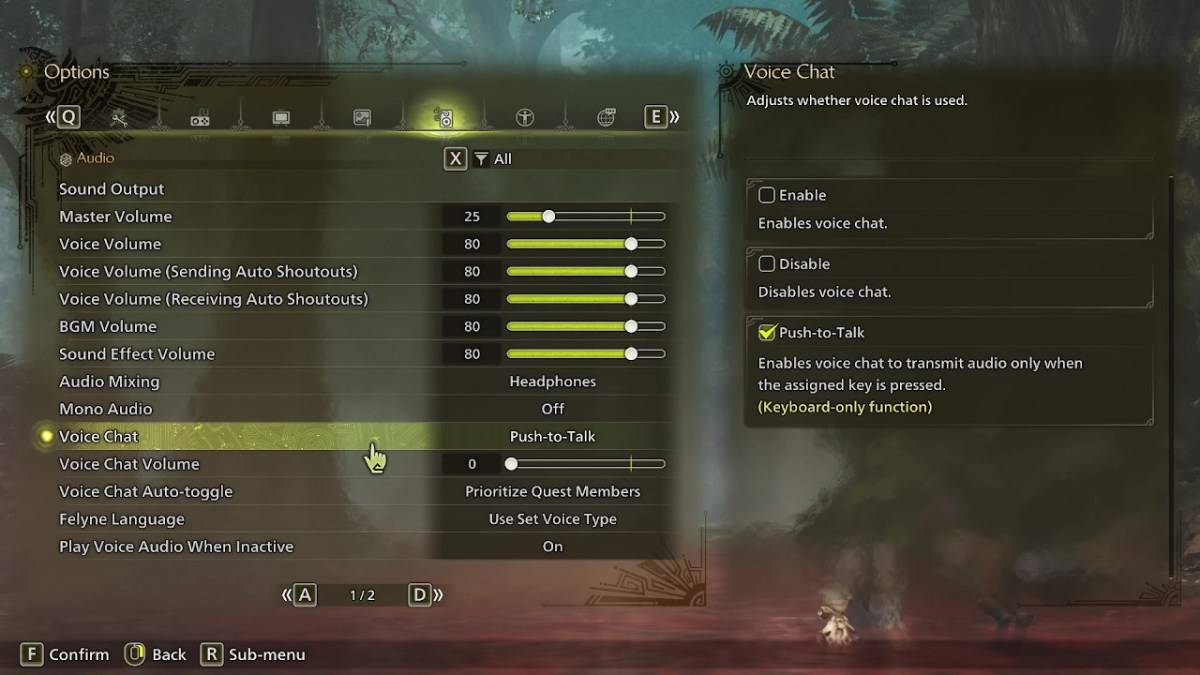
All voice chat settings can be found in the audio section of the game's menu. Whether you're in-game or on the main menu, navigate to the options and select the third tab from the right. Scroll down slightly, and you'll find the Voice Chat setting with three options: enable, disable, and push-to-talk. Choosing 'enable' keeps the voice chat on continuously, 'disable' turns it off entirely, and 'push-to-talk' activates it only when you press a designated key, which is exclusive to keyboard users.
You'll also find additional options like voice chat volume, which adjusts the loudness of the chat for your ears, and voice chat auto-toggle. The auto-toggle feature allows you to set priorities for voice communication, either favoring quest members, link party members, or opting out of automatic switching. Quest members are those you're actively hunting with, making this the go-to choice for most players. On the other hand, link members refer to those in your link party, ideal for assisting others through the game's narrative, as you may need to wait for them during cutscenes.
That covers everything you need to know about voice chat in *Monster Hunter Wilds*. While the in-game audio quality might not match that of dedicated apps, having the option built-in is beneficial, especially for cross-platform play. For the best experience, consider using external communication tools, but the in-game voice chat remains a handy feature for quick and easy communication.

 LATEST ARTICLES