Disney Solitaire is a delightful, family-friendly card game that infuses the classic solitaire experience with a touch of Disney magic. Unlike traditional solitaire, Disney Solitaire introduces special power-ups and themed events, adding layers of strategy and excitement to the game. Each Disney character enriches the gameplay with unique narratives, creating a nostalgic yet engaging experience for players of all ages. While the game is easy to grasp, we've compiled some advanced tips in this guide to help new players progress more quickly. Let's dive in!
Tip #1. Learn how Card Management works!
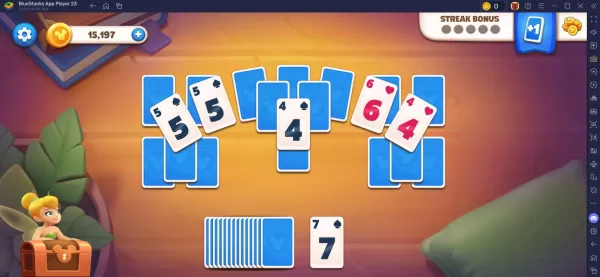
Disney Solitaire isn't your typical solitaire game; it has a distinctive twist. Players can only remove cards from the table that are one rank higher or lower than the card at the bottom. If there are no matching cards available, you'll need to draw a card and hope for the best. This straightforward mechanic remains consistent throughout the game, with minimal variations. Therefore, it's crucial for players to keep this in mind, especially when facing challenging levels. Your primary objective in each level is to unflip all the cards on the table and add them to the bottom until none remain!
Tip #5. Use Runner Cards to Aid you in Victory
Runner cards are a unique feature exclusive to Disney Solitaire. These cards allow you to change the rank of any card on the table. There are two types of Runner cards: the Runner Up Card, which increases the rank of the selected card by one, and the Runner Down Card, which decreases the rank by one. These cards prove invaluable in sticky situations where you're left with no other option but to draw more cards.
For an enhanced gaming experience, players can enjoy Disney Solitaire on a larger screen using their PC or laptop with BlueStacks, along with the precision of a keyboard and mouse.

 LATEST ARTICLES