Mastering the Minecraft Mob-Killing Commands: A Comprehensive Guide
There are many reasons why you might want to eliminate mobs in Minecraft. The most efficient method is using commands, specifically the /kill command. However, even this seemingly simple command has some nuances. This guide explains how to effectively target and remove mobs.
Using the /kill Command
Before employing the /kill command, ensure your world has cheats enabled. (Instructions on enabling cheats are provided below).
The basic /kill command, simply typing /kill in the chat, will unfortunately kill you. To target mobs, you need to add specific syntax.
To eliminate all mobs:
/kill @e[type=!minecraft:player] This targets all entities (@e) excluding players (type=!minecraft:player).
To target specific mob types (e.g., chickens):
/kill @e[type=minecraft:chicken]
Targeting mobs within a specific radius:
- Java Edition:
/kill @e[distance=..15] (kills mobs within 15 blocks)
- Bedrock Edition:
/kill @e[r=10] (kills mobs within 10 blocks)
To target a specific mob type within a radius:
- Java Edition:
/kill @e[distance=..15,type=minecraft:sheep] (kills sheep within 15 blocks)
- Bedrock Edition:
/kill @e[r=10,type=minecraft:sheep] (kills sheep within 10 blocks)
The game autocompletes commands, so memorization isn't strictly necessary. Experimentation will quickly familiarize you with the command structure.
Important Selectors:
Beyond @e, other selectors target different entities:
@p: Nearest player@r: Random player@a: All players@e: All entities@s: Yourself
Enabling Cheats/Commands
Commands won't function without cheats enabled. Here's how to activate them:
Java Edition:
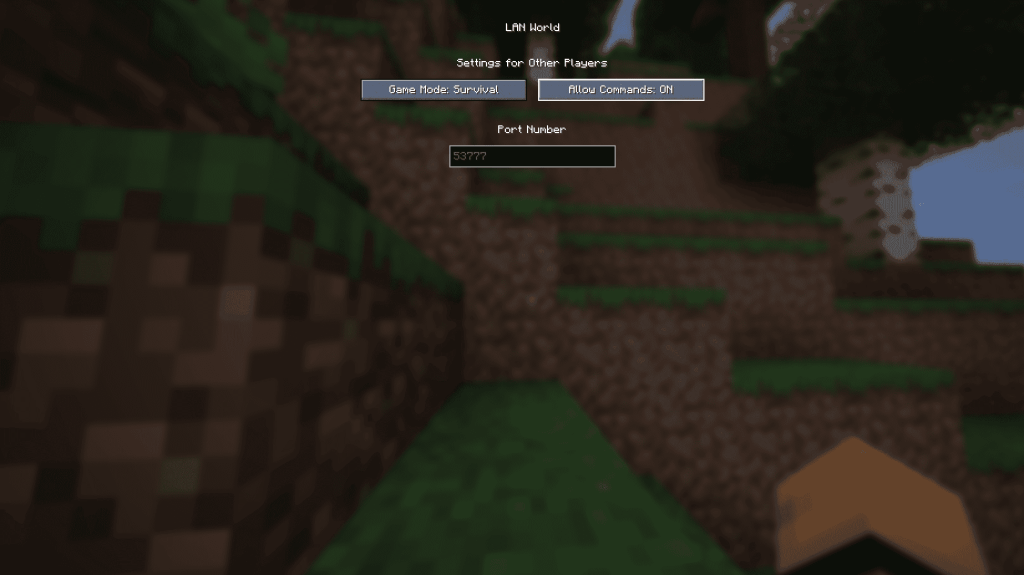
- Enter your world.
- Press Esc.
- Select "Open to LAN."
- Toggle "Allow Commands" to "On."
Note: This enables cheats for the current session only. To permanently enable cheats, create a new world with cheats enabled during world creation.
Bedrock Edition:
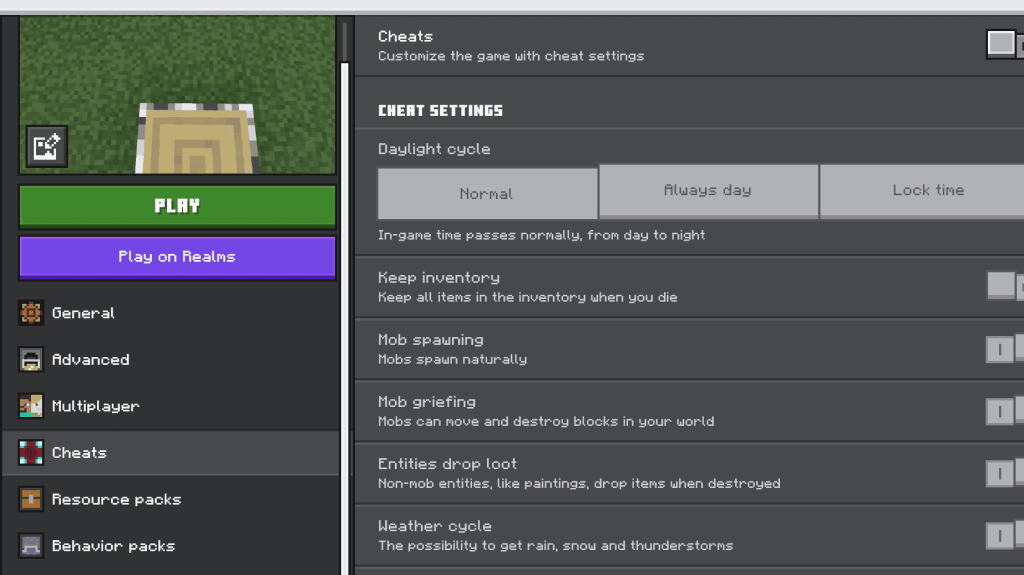
- Navigate to your worlds.
- Click the pencil icon next to the desired world.
- In the settings menu, toggle "Cheats" to "On."
Minecraft is available on PlayStation, Xbox, Nintendo Switch, PC, and mobile devices.

 LATEST ARTICLES